Smartphones connect us to family, friends, and everyday services, but modern mobile operating systems are often overly complicated. Tiny text, nested menus, sensitive touchscreens, and endless notifications create everyday hurdles for older adults, especially those dealing with age-related vision changes, tremors, or cognitive decline.
Too often, simple daily tasks like placing a call to a grandchild or answering a ring turn into moments of frustration and anxiety. Meanwhile, adult children and caregivers find themselves constantly troubleshooting phones that were accidentally muted, had icons rearranged, or had apps deleted.
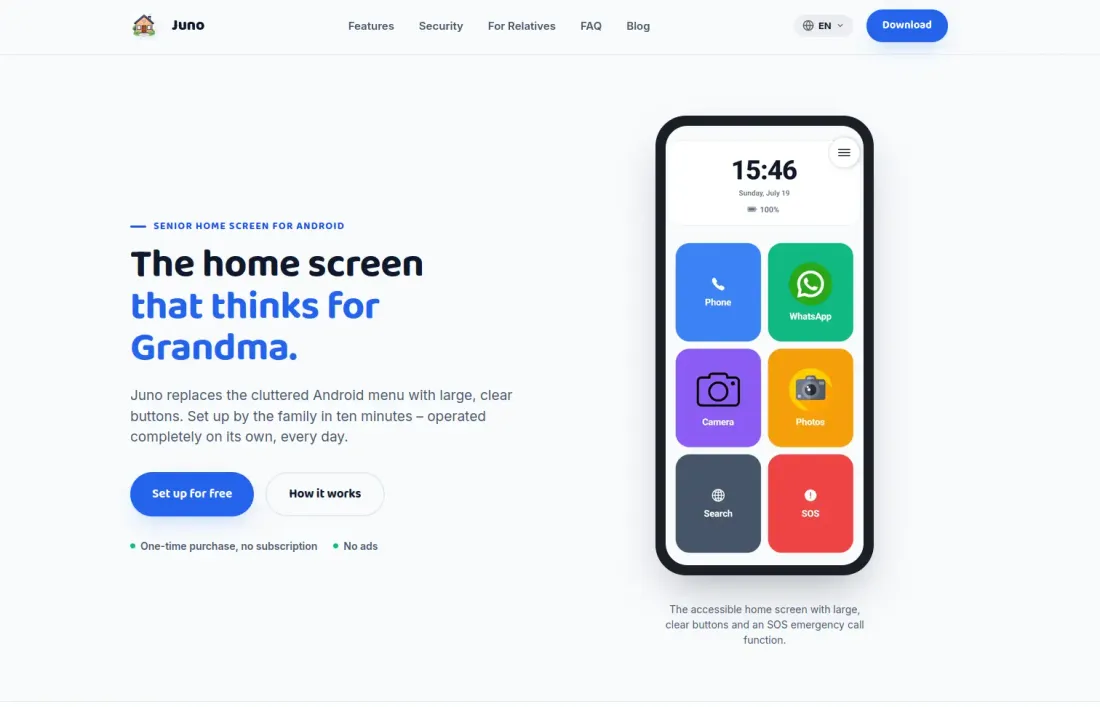
That is why we built Juno Senior Phone Launcher (also known as Easy Senior Launcher): an accessible, reliable, and completely ad-free Android launcher designed to turn any Android phone into a simplified, stress-free device. It provides independence for older family members and genuine peace of mind for the people who care for them.
⚡ Highlights at a Glance
- Extra-Large Buttons & Readable Typography: Big, high-contrast buttons designed for aging eyes and readable without reaching for reading glasses.
- Tremor & Misclick Protection: Configurable touch delays prevent accidental taps and erratic swipes for users with shaky hands or Parkinson’s symptoms.
- Simplified In-Call Experience: Clear caller photos and a prominent red hang-up button eliminate phone anxiety.
- Automatic Volume Protection: Automatically restores ringtone volume if the device is accidentally muted, ensuring important calls are never missed.
- One-Touch SOS Emergency System: Instantly rings emergency contacts and sends an automated SMS with real-time Google Maps GPS coordinates.
- PIN-Protected Kiosk Mode: Locks down settings and layouts so seniors cannot accidentally delete apps or alter critical system configurations.
- 100% Ad-Free & Privacy-First: No popups, no data tracking, and no subscriptions. Runs smoothly on Android 7.0+ devices.

Designed for Seniors, Built for Caregivers
1. Large Buttons & Large Text: Effortless Navigation
Standard mobile interfaces require fine motor skills and sharp eyesight. Juno redesigns the home screen from scratch:
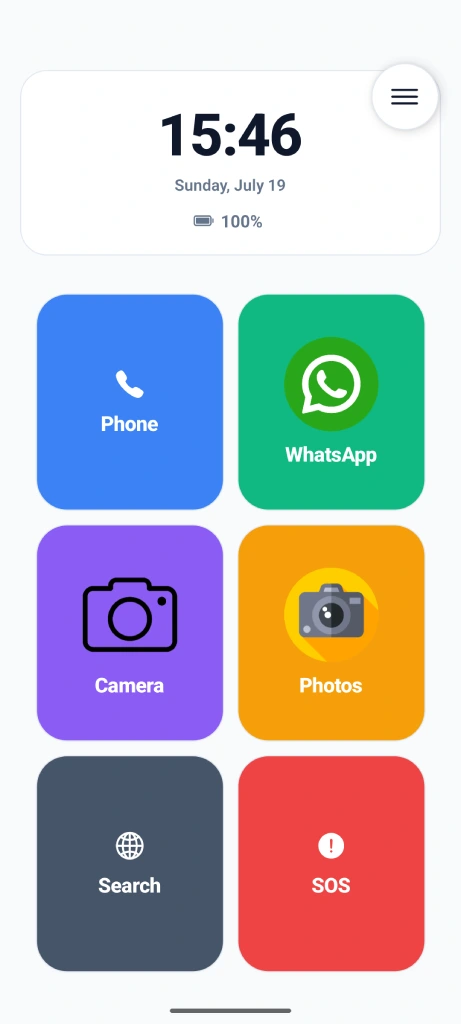
- Oversized App Tiles: Vital functions—Phone, Messages, Camera, Photos—are displayed as bold, recognizable tiles that are impossible to miss.
- Tremor Shield (Touch Delay): Shaky hands can easily cause double taps or trigger unintended apps. Juno lets caregivers configure an intentional touch-and-hold delay, filtering out erratic tremors.
- Never Miss a Call with Volume Guard: A common issue seniors face is brushing the side volume rocker and accidentally setting the phone to “Do Not Disturb” or silent. Juno monitors ringtone levels and restores audibility automatically.
- Simplified Call Screen: Incoming and ongoing calls feature large contact portraits and a massive, unmistakable red button to disconnect with confidence.
2. Lifesaving SOS & Family Safety Features
Peace of mind is paramount. Juno integrates crucial emergency tools directly into the main interface without adding complexity:
- One-Touch SOS Alarm: In an emergency, tapping the SOS button immediately alerts designated family contacts. It initiates a phone call and dispatches an automated SMS containing a direct Google Maps GPS link to the senior’s exact location.
- Audible False-Alarm Countdown: To prevent accidental dials, activating SOS initiates an audible countdown timer with a clear cancel button, allowing false alarms to be stopped before emergency contacts are notified.
- Visual Low-Battery Reminders: Older adults often forget to recharge their devices. Rather than relying on a tiny status bar icon, Juno presents a clear full-screen prompt reminding them to plug the phone in.
- High-Visibility Notification Badges: Instead of subtle notification dots, active apps pulse with distinct colored borders to clearly signal unread messages or missed calls.
3. PIN-Protected Kiosk Mode: Caregiver Control
Setting up a phone for an aging parent usually means having to fix it every couple of days. Juno solves this with a robust Kiosk Mode protected by an administrative PIN:
- Tamper-Proof Home Screen: Seniors can safely navigate between approved apps without the danger of dragging icons into folders, deleting apps, or stumbling into confusing system settings.
- One-Tap Photo Speed Dials: Assign direct-dial tiles with cheerful photos of children, grandchildren, or caregivers. Calling loved ones is as easy as tapping a familiar face.
- High-Contrast Themes: Choose between tailored color palettes designed for maximum contrast, specifically helpful for individuals with macular degeneration, cataracts, or glaucoma.
- Rapid Backup & Setup (< 2 Minutes): Export your customized configuration to Google Drive. If a device ever needs replacement, you can set up a brand-new senior phone in less than two minutes.
4. Privacy, Reliability & Battery Efficiency
Unlike many ad-supported senior tools, Juno is crafted around core digital ethics:
- Strictly Ad-Free: Zero third-party advertisements, banner overlays, or commercial popups.
- Privacy-First Architecture: Your family’s data belongs to you. We do not track usage or monetize personal information. GPS permissions are utilized exclusively during active SOS emergency requests.
- Lightweight & Battery-Friendly: Engineered to be ultra-efficient, Juno runs smoothly even on older or budget-friendly Android smartphones (compatible with Android 7.0 and up).
Dedicated Website & Setup Guides
To support families and caregivers, we have also launched a dedicated project hub with comprehensive setup guides, hardware recommendations, and accessibility FAQs at easyseniorlauncher.com:
Give Your Loved Ones Independence and Yourself Peace of Mind
Whether you want to repurpose an existing smartphone for an aging parent, help a relative living with tremors stay in touch, or set up a distraction-free emergency phone, Juno Senior Launcher offers the right balance of simplicity, safety, and caregiver control.
You can download Juno directly from the Google Play Store or visit our dedicated project website for detailed setup guides and tutorials:
- Google Play: Get Juno Senior Launcher
- Official Website: easyseniorlauncher.com
- App Overview on Dancing Macaw: View Juno App Page